
5.7 KiB
Executable file
N8N Setup
links
important values
data
login
| key | value |
|---|---|
| host | https://n8n.ronnyabraham.com |
| web email | ronny.abraham@ymail.com |
| web password | chukatHat6rah |
licence info
| key | value |
|---|---|
| license activation | 5b1d6e31-81c6-4c31-84c1-56f30c9afc85 |
| docker auth | admin-n8n |
| docker pass | 2reishit2ara |
| port | 5678 |
mount points
| purpose | path |
|---|---|
| docker location | /mnt/storage/docker/compose/n8n |
| mount location | /mnt/storage/srv/n8n |
| config | ├──config |
| data | ├──data |
DNS Record for n8n
| Field | Value | Description |
|---|---|---|
| Record Name | n8n.ronnyabraham.com | Full subdomain |
| Record Type | A | IPv4 address record |
| Value | 94.159.253.187 | Your public IP |
| Alias | No | Not a CNAME |
| TTL (seconds) | 300 | 5 minutes cache time |
| Routing Policy | Simple | Standard routing |
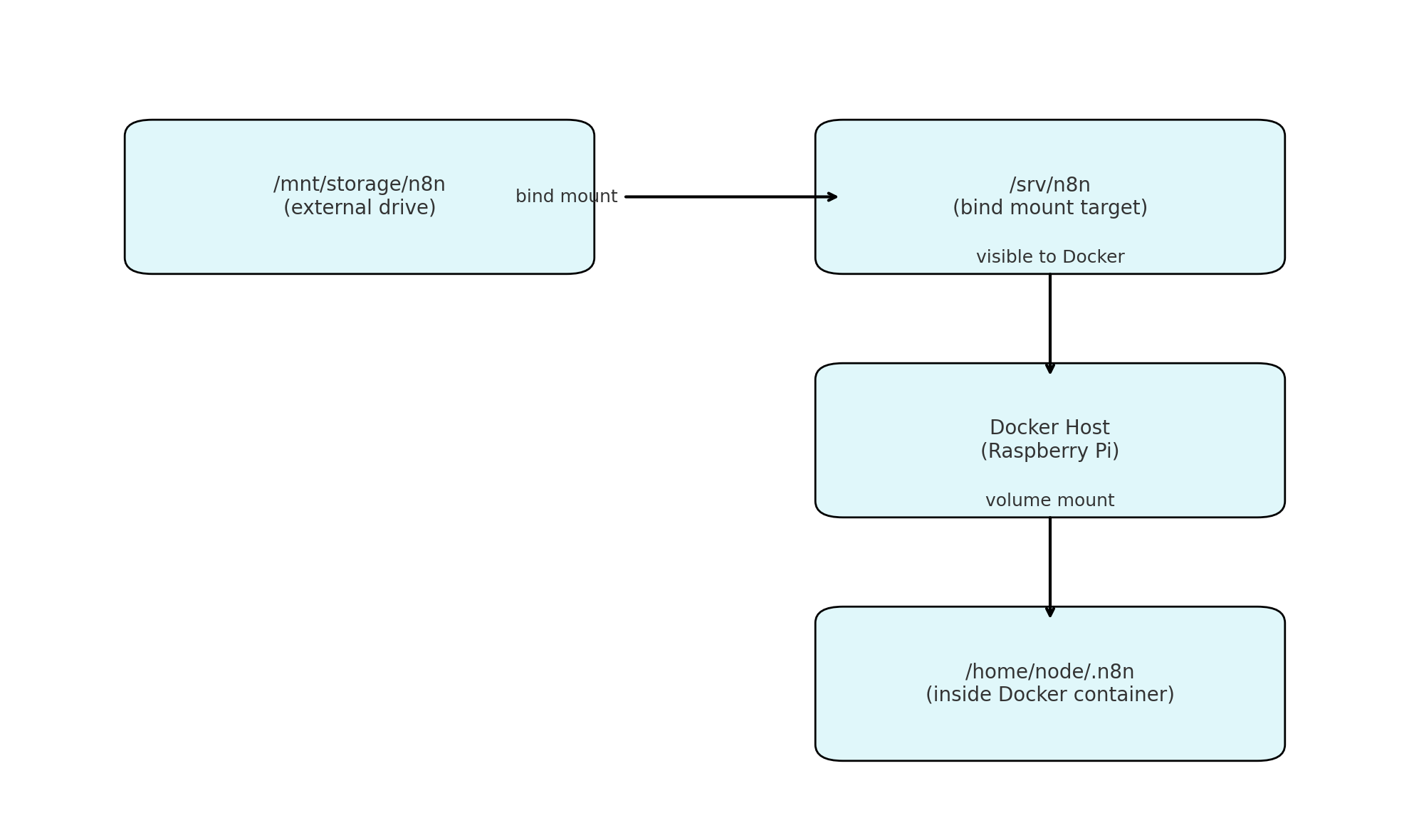
N8N mount setup
- Left box
- /mnt/storage/srv/n8n — the actual directory on your external drive
- Top-right box
- /srv/n8n — where the system accesses it via a bind mount
- Middle-right box
- Docker host — this is your Pi's environment
- Bottom-right box
- home/node.n8n — inside the container, this is where n8n looks for its data
permission setup
sudo chown -R ronny:ronny /mnt/storage/srv/n8n
sudo mount -a
sudo chown -R ronny:ronny /srv/n8n
chmod 700 /srv/n8n
fstab
/mnt/storage/srv/n8n /srv/n8n none bind 0 0scripts
docker-compose.yml
nginx
Potential Issue
Why `curl http://localhost:5678` might fail even when Nginx works
n8n uses the `N8N_HOST` environment variable to validate incoming requests. If a request arrives with a `Host` header that does not match `N8N_HOST`, n8n may reject it or reset the connection.
This is often encountered when using `curl` directly against `localhost`.
Request Behavior
| Command | Result | Reason |
|---|---|---|
| curl -I http://localhost:5678 | Fail | Host header is "localhost" which doesn't match n8n setting |
| curl -I http://localhost:5678 -H "Host: n8n.ronnyabraham.com" | Pass | Host header matches expected `N8N_HOST` value |
| curl -I https://n8n.ronnyabraham.com | Pass | Routed via Nginx which forwards the correct Host header |
Explanation
n8n enforces `N8N_HOST` to ensure external requests match the configured hostname. When accessed locally via `curl`, the default Host header is `"localhost"`, which does not align with the configured hostname (`n8n.ronnyabraham.com`). This causes the connection to be reset or denied.
To test the service directly from the host machine, you must manually set the correct Host header using `-H "Host: n8n.ronnyabraham.com"`.
Alternatively, access the service through its public HTTPS URL, which is routed through Nginx and includes the correct headers automatically.
Options
.env + secrets the clean way
- Store sensitive values in a `.env` file instead of `docker-compose.yml`
- Keeps secrets out of version control
- Easier to manage and change later
Example `.env` file:
N8N_BASIC_AUTH_USER=admin
N8N_BASIC_AUTH_PASSWORD=your_strong_password
N8N_HOST=n8n.ronnyabraham.com
N8N_PROTOCOL=https
N8N_PORT=5678
In `docker-compose.yml`:
environment:
  - N8N_BASIC_AUTH_USER=${N8N_BASIC_AUTH_USER}
  - N8N_BASIC_AUTH_PASSWORD=${N8N_BASIC_AUTH_PASSWORD}
  - N8N_HOST=${N8N_HOST}
  - N8N_PORT=${N8N_PORT}
  - N8N_PROTOCOL=${N8N_PROTOCOL}
Workflow backups to external drives
- Backup `/srv/n8n` regularly
- Prevents data loss from crashes or SD card issues
Example backup script:
rsync -avh /srv/n8n /mnt/backup/n8n-backup-$(date +%F)To schedule it:
crontab -e
# Add:
0 3 * * * /home/ronny/scripts/backup-n8n.sh
Remote editing with VS Code or SSH
- Manage Pi remotely from your laptop
Option A: VS Code Remote SSH
Install extension: `Remote - SSH`
Sample SSH config:
Host raspberrypi
  HostName 192.168.1.42
  User ronny
Use: `Remote-SSH: Connect to Host…`
Option B: Plain SSH from terminal
ssh ronny@192.168.1.42
nano ~/n8n/docker-compose.yml