
12 KiB
Section 03 - Lessons 16 | Creating Facebook Ads
- Links
- Notes
Notes
facebook page -> facebook ads
- page and ads are seperate from personal profile
-
profile is only needed to create a Page and Business Manager
- business manager is linked with personal account login
- not published with friends unless invited
- you have to create Page before creating an Ad
- http://www.facebook.com/pages/creation
facebook ad creation levels (steps)

- CAMPAIGN level set your objective
-
AD SET level
- set audience/ targeting
- set budget/ schedule
- set placement
- AD level create your ad
step 1 - campaign objective
- where you select what you want people to do when they get to your ad
- when you create ads, choose your objective
- using the correct CAMPAIN OBJECTIVE will help convert customers at each step of the funnel
consider ADs as a giant set of funnels
top of the funnel
- building awareness about your brand
- finding new potential customers
as they work down the funnel
-
direct them to take action
- make a purchase
- sign up for XYZ
step 2 - ad set
-
editing ad set will change Estimated Audience Size of ad campaign
- smaller audiences cost more, but are more relevent
- broad audiences will be lower cost, but are better for top of funnel ads
step 3 - the ad itself
-
create actual ad
- select media
- format
- links
- call to action
ad formats
| format | description |
|---|---|
| image | ad specs and facebook images guide |
| video/slideshow | ad specs and facebook video guide |
| carousel | ad specs and facebook carousel guide |
| collection | ad specs and facebook collection guide |
| instant experience | ad specs and facebook instant experience guide |
how to create Facebook ads
- navigate to Ads manager http://business.facebook.com/adsmanager
-
click create button

-
choose buying type and campaing objective


campaign objectives
awareness
- show ads to people who are most likely to remember them
-
good for
- reach
- brand awareness
- video views
- store location awareness
traffic
- send people to a destination, like your website, app, instagram profile or facebok event
-
good for
- link clicks
- landing page views
- instagram profile visits
- messenger, instagram, and whatsapp
engagement
- get more messages, purchases through messaging, video views, post engagement, Page likes or event responses
-
good for
- messenger, instagram and whatsapp
- video views
- post engagement
- conversions
- calls
leads
- collect leads for your business or brand
-
good for
- instant forms
- messenger and instagram
- conversions
- calls
app promotion
- find new people to install your app and continue using it
-
good for
- app installs
- app events
sales
- find people likely to purchase your product or service
-
good for
- conversions
- catalog sales
- messenger, instagram and whatsapp
- calls
example using objectives to incrase sales
engagment objective
-
create posts with
- offer coupon
- discount
- etc
- increase engagement of Facebook page posts
app promotion
- increase installs of your mobile app
sales objective -> conversions
-
increase website conversions
- sales
- sign-ups
- retarget warm audiences (users that have interacted with site or ad)
- close the sale
-
example
- promote an expiring coupon code to urge warm audience to make a purchase
leads objective -> messages
- connect with customers
- answer questions
- drive them from interest to purchase
first three steps of campaing objective
- select objective
- always choose manual setup
-
name the campaign
-
e.g. CE-Traffic-men1830-USA
- CE: Course Envy
- Traffic: campaign objective
- men1830: targeting men of ages 18-30
- USA: country targeted
-
-
campaign budget
-
type
- daily
- lifetime
-
optimization
- distributes across ads to get more results
-
help menu
- lower left hand corner]
budget
- start between $5 to $10 daily budget
-
when you see a high Return on Marketing Investment
- shut off losing ads
- continue testing winning ads
winning metrics
- ad relevance: greater than 60%
- cost per click (CPC): greater than 2%
- Cost Per Lead (CPL): less than $1 (ONE dollar) (depends on industry)
- Lead Capture Page Conversions: greater than 10%
scaling budget
- must have winning budget
- highly converting ad runnig
- at that point scale up by 25% every 3-4 days
how to create each type of facebook campaign
awareness
| purpose | increase awareness for brand |
| targets | facebook, instagram, messenger |
| formats | single image, single video, carousel slideshow |
goal
- increase Brand Recall Lift (number of people likely to remember your ads wihtin two days)
- emotinally resonate with target customer
- DO NOT SELL
- AWARENESS ONLY
purpose
-
this is a touch point with a customer
- a customer needs on average 7 touch points (visually seeing brand) before remembering and purchasing from your business
- introduction / ongoing "remember me" ad
best practices
-
subtle uses of brand
- associates talent and skill to brand
- emotion provoking stories with brand
-
if no story or logo, then promote for FREE to learn more about brand
- pillar blog post
- service
- trial
- newsletter
- ebook
- webinar
audience
- make audience wide
- we are in discovery phase
-
to find your current audience
- go to facebook page
- professional dashboard
- click on Audience
-
if you can't find Audience controls
- got to Advantage+ Audience
- TURN IT OFF
- you got back your audience controls

placements
- generally leave it on Advantage+, but it's a good option to SPLIT TEST
-
but if you want to go to MANUAL, then you have to TURN OFF ADVANTAGE
- first move the mouse over to where it says Advantage+ placements

- this will show highlight the 'Edit' button

- click 'Edit'
- if you want, you can now select 'Manual placements'
mobile test website
- open your website or Facebook AD landing page URL in gogle chrome browser.
- right click anywhere on the page
- select inspect in the menu
- click desktop mobie view toggle button
AD level
naming ad
-
use a name that describes the following:
- ad identity
- media
- call to action
- text
- links
ad identity
- select facebook page
- instagram account
-

media
- Go to Ad Creative Section
- click on 'Set up Creative'
-
pick either image or video
- video is best
-
otherwise test three image options

call to action
-
in the case of a Traffic or Engagement add you can send someone somewhere
- under destination
Detailed targeting
- found in Ad Set
-
in the audience section
- specify interests in the detailed targeting section
Carousel Ads
- with a carousel you can identify which ad has the most clicks
- take that ad and use it in a new campaign
Engagement Ads
-
to engage people with facebook page or post
- boosting posts
- getting page likes
- event responses/attendance
ad formats
- single image
- single video
- slideshow
best practices
-
very little organic reach
- less than 10% are organic
- you must create post engagement ads
-
before you do that
-
get clients to aminimum of 1000 page likes
- so when a new customer sees the page they will be impressed
-
Create Post Engagement Ad
New Campaign
-
choose engagement objective
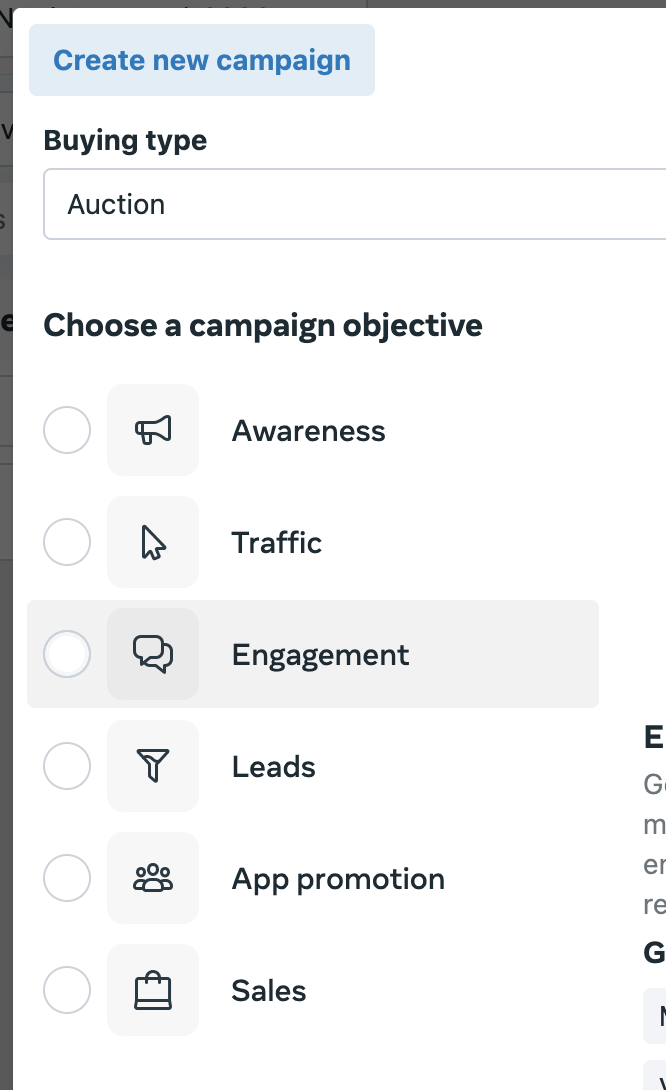
AD Set
-
Set Conversion Location to "on your ad"

-
set Engagement Type to 'Post Engagement'

-
set Performance Goals to 'Maximize Engagement with Post'

- set Performance Goals to 'Maximize Engagement with Post'
-
make sure to exclude people who already like your page

- leave placements as Advantage+
New Ad
-
split test using a single image AND a single video
- you want lowest cost per page like
- give users an instant reason to like your page
best proctices for Post Engagement
- this is meant to boost a specific post on page
-
facebook will target users more likely to engage
- like
- comment
- share post
- if you want traffic to a site, such as a link, use a Traffic of Conversion objective
Post Engagement Split Test
-
create 3 campaign split tests
- target a looklike audience of current facebook page followers
-
go broad and target competitors facebook page (or similar)
- enable "advantage detailed targeting" option
- target just current facebook page followers via custom audience
Lookalike Audience
- in Ad Set
-
Go to Audience and select create new -> 'lookalike audience'
- select lookalike source
- choose small lookalike at 1%
Competitor
- good top of funnel ad
- good for making lookalike audiences
- add interests in detailed targeting
-
click on "advantage detailed targeting" option
- allows you ta add competitors you forgot to add
Current
- if you have 1000 followers its enough